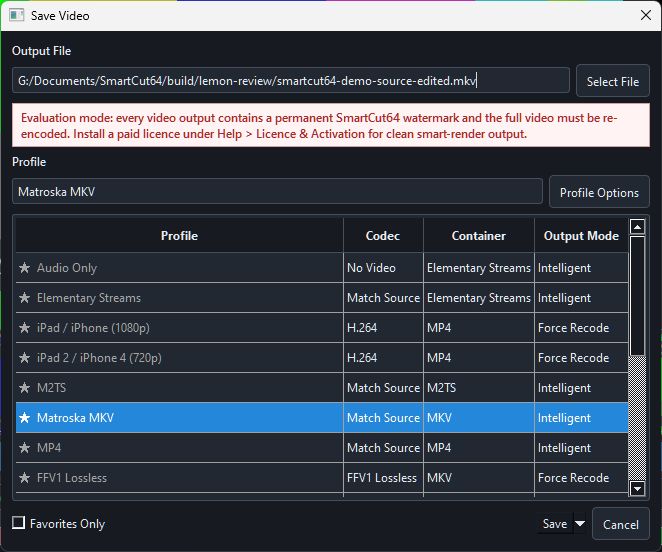
Profile roles
- Intelligent Match Source profiles retain compatible codecs and smart-render exact boundaries.
- Keyframe-only copy profiles avoid video encoding by aligning edits to safe access points.
- Force Recode profiles decode and encode all kept pictures for a requested delivery format.
- Audio Only and Elementary Streams profiles omit a normal multiplexed video container by design.
Converting AV1 to another codec
The plain MP4 and Matroska MKV profiles retain the source video codec when compatible. Selecting MP4 alone does not convert AV1 to H.264.
For AV1 to HEVC, choose HEVC MP4 (Automatic Recode) or HEVC MKV (Automatic Recode). For H.264, create a custom Force Recode profile with H.264 as the video encoder and MP4 or MKV as the container. Use software encoding if your selected GPU does not support the requested encoder.
AV1 is also available as a custom output encoder. Codec conversion is supported; evaluation deliveries retain their normal watermark.
Container compatibility first
A profile is not only a filename extension. It defines container, codec policy, stream handling and validation. If a selected stream cannot be represented, choose a suggested compatible container, deselect that stream or select a working transcode.
Favourites and defaults
Mark frequently used profiles as favourites and use Favorites Only in the Save Video window to shorten the list. Default output folders and extensions are configured separately from the profile's encoding decisions.